

Source IDs and Context-Preserving Tables: Making Reverb a Grounding-Ready Surface for AI
How ePublisher 2026.1's Source ID landmarks and Markdown++ multiline tables make Reverb 2.0 a grounding-ready surface for the AI Assistant.

Erin West
Sales and Business Development Manager
Source IDs and Context-Preserving Tables: Making Reverb a Grounding-Ready Surface for AI
An AI Assistant is only as trustworthy as the citation underneath the answer. The Reverb 2.0 build pipeline has always produced two things on every publish: an HTML helpset for human readers, and (since 2025.1) a Knowledge Files set for the AI Assistant and any external AI pipeline the customer operates. The link between those two artifacts is the landmark ID, the anchor that lets an Assistant response point back to a specific topic or heading in the published help.
ePublisher 2026.1 changes how those landmark IDs are addressed in URLs. Every paragraph style in the Reverb 2.0 target gains a Landmark ID Format option with three values: Hashed (16 char), Hashed (8 char), and Source ID. With Source ID selected on a style, the alias declared in the source content for paragraphs of that style becomes the URL fragment in the published Reverb 2.0 output. The address is stable, human-readable, and authored, not derived.
Combined with Markdown++ multiline tables, which preserve the internal structure of each cell, this gives the AI Assistant (and any RAG pipeline running over the Knowledge Files) a better surface to ground on.
What changes in 2026.1
Every paragraph style in the Reverb 2.0 target gains a Landmark ID Format option in Style Designer, with three values:
- Hashed (16 char): a 16-character hash derived from the landmark's source content. Collision-resistant across large helpsets; the default for backward compatibility.
- Hashed (8 char): a shorter 8-character hash. Cleaner URLs, slightly higher collision probability on very large helpsets.
- Source ID (new in 2026.1): the landmark URL is read directly from the alias declared in the source content.
The hashed modes produce stable URLs build-over-build for the same source, but they are not human-readable and they are not authored. A reader who looks at a URL ending in #a8c2f1d4b9 cannot tell what topic it points to. A writer who renames a heading does not control whether the URL changes.
A hash tells you nothing about the content it points to. A Source ID tells you everything.
Because the option lives at the paragraph style, you decide which anchors get the readable Source ID treatment, and you don't have to decide all at once. A typical adoption: set Source ID on the heading styles that name your major sections (Heading1, Heading2 and maybe Heading3) and leave the rest on Hashed (16 char). The headings your readers actually navigate by become semantic, deep-linkable, and citation-friendly; the minor ones stay collision-free without any new authoring discipline.
Configuration lives in Designer, where Stationery is authored and maintained. AutoMap and Express publish from a Stationery and inherit whichever per-style values it defines, so you make the change once and every downstream build picks it up.
DITA-source content gets the matching upstream piece in the same release. The DITA adapter has a new Use source IDs for paragraph IDs setting that preserves DITA @id attributes through the pipeline as Reverb 2.0 landmark source IDs, so DITA authors get the same author-controlled URLs as Markdown++ authors wherever a paragraph style uses Landmark ID Format = Source ID.
Selecting Source ID on a heading style reads the alias declared on the source heading directly into the URL:
Note: The following is referred to as a Markdown++ "triple", which is a recommended way to ensure
Title,Heading 1, and sometimes structuralHeading 2paragraphs can be universally referenced. See https://github.com/quadralay/markdown-plus-plus/blob/main/spec/cross-file-link-resolution.md.
<!--#upgrade-procedure-->
## Upgrade procedure

[upgrade-procedure]: #upgrade-procedure "Upgrade procedure"
The three pieces, the alias directive, the heading itself, and the link reference definition, make the heading externally referenceable with a stable, semantic name. The #alias is the landmark ID that flows through to the published Reverb 2.0 URL when Landmark ID Format = Source ID.
With Source ID enabled, that heading is addressable in the published Reverb 2.0 output at topic.html#upgrade-procedure. The same alias is the landmark ID inside the topic's Knowledge File. The author controls the URL, the URL describes the content, and the address persists across publishes regardless of how the surrounding prose changes.
Why this matters for grounding
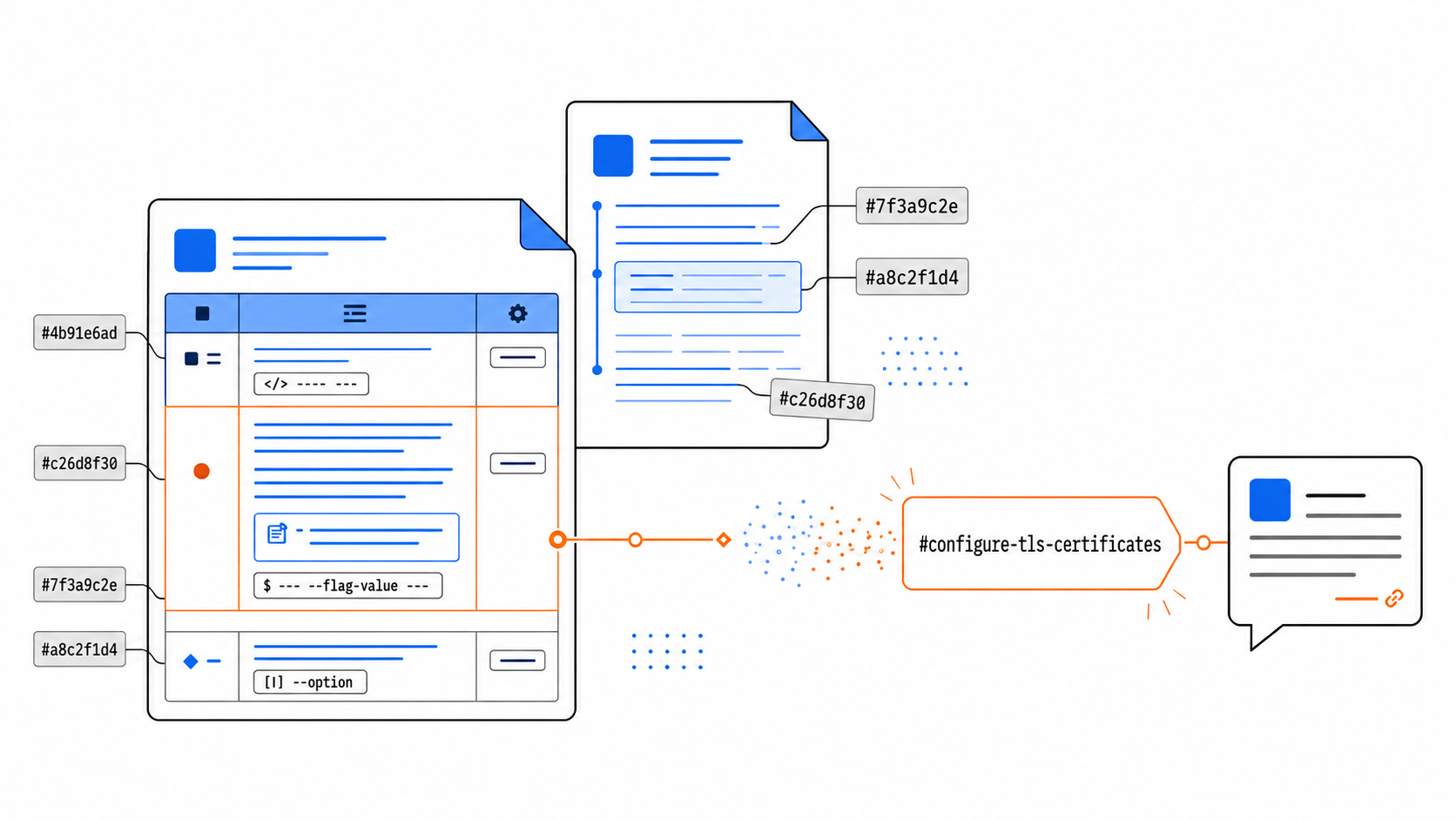
When the Assistant answers a reader's question, it returns annotation links: clickable citations into the helpset, keyed to landmark IDs. With Source ID URLs, three things become true at once:
- The citation is legible. A reader hovering an annotation link sees
#configure-tls-certificates, not#7f3a9c2e. The link itself communicates where the answer is grounded before the reader clicks it. - The citation survives editorial churn. A heading rename or reordering does not change the alias. An annotation link captured in a saved chat transcript or a third-party reference still resolves months later.
- The Knowledge File and the helpset share the same address. The Assistant retrieves a chunk by
#configure-tls-certificatesand the published page exposes the same fragment. Round-trips are exact, not approximate.
This is the practical form of citation grounding: every claim an Assistant returns is anchored to a specific, verifiable location in the source documentation, and that location is named by the author rather than synthesized by the build.
Multiline tables: preserving the context inside a cell
Plain Markdown tables flatten everything to a single line. Lists, paragraphs, callouts, and code samples inside a cell are not expressible. For chat retrieval, that flattening forces a hard choice: either return the entire table as one chunk (losing per-row precision) or split rows lossily (losing structural context).
Markdown++ multiline tables don't force that choice.
The <!--multiline--> directive switches a table to block-content cells, where each cell can contain the full range of Markdown: paragraphs, nested lists, code blocks, even Markdown++ style directives:
<!-- multiline -->
| Setting           | Description                                                  | Default                   |
|-------------------|--------------------------------------------------------------|---------------------------|
| `tls.cert_path`   | Absolute path to the PEM-encoded certificate.                | `/etc/app/tls/server.crt` |
|                   | <!--style:BQ_Note-->                                         |                           |
|                   | > Must be readable by the service account.                   |                           |
|                   |                                                               |                           |
| `tls.min_version` | Minimum TLS protocol version. Supported values: `1.2`, `1.3`. | `1.3`                     |
The continuation rows (empty first cell) append block content to the previous row's Description cell, so the rendered cell contains a paragraph followed by a BQ_Note-styled blockquote. The <!--style:BQ_Note--> directive sits directly above the > blockquote with no blank line between, satisfying the Markdown++ attachment rule. The fully-whitespace row that follows is the explicit row separator that the multiline algorithm requires between logical rows; without it, the parser cannot tell where the tls.cert_path row ends and the tls.min_version row begins.
When ePublisher publishes this to Reverb 2.0, each cell becomes a structured block with its own landmark. When the matching Knowledge File is generated, the table preserves the same structure. A retrieval against the question "what file does tls.cert_path point to?" can return the cell with the Note callout intact, not a flattened sentence with the note collapsed into the prose around it.
The Assistant's annotation link can point to the specific cell, and with Source ID enabled, that cell address is something the author named.
Compatibility and trade-offs
Source ID is an opt-in Landmark ID Format value, selected per paragraph style. Existing Reverb 2.0 helpsets continue to publish with Hashed (16 char) as the default on every style: no upgrade-driven URL churn. If you want the new addressing model, switch Landmark ID Format to Source ID on the heading styles you care about and republish. If you have deep-link constraints (existing context-sensitive help wiring, third-party links into the helpset), leave the setting at Hashed (16 char) or Hashed (8 char) indefinitely on any or all styles. Per-style granularity means adoption is incremental: switch Heading1 to Source ID first, ship, and expand to Heading2/3 later as your alias discipline matures.
Two honest constraints come with Source ID:
- Alias uniqueness is your responsibility. With hash modes, the build guarantees collision-free URLs across the helpset. With Source ID, two headings authored with the same alias produce a collision. ePublisher reports collisions at build time, and Markdown++ tooling (the markdown-plus-plus skill, the linting workflow) can catch them earlier.
- Alias stability is now an editorial discipline. Renaming an alias is a URL break. If you adopt Source ID, treat alias IDs the way you already treat published API names: a deliberate naming decision, reviewed when introduced, changed only with intent.
It's the same trade-off you already make anywhere else you move from auto-generated to author-controlled URLs: more control, more responsibility. For AI grounding, the control is what makes the citation trustworthy.
None of this requires new authoring habits if you're already writing clean Markdown++. Add an alias to the headings you want addressable, set Landmark ID Format = Source ID on those styles in Designer, and republish. The citations your AI Assistant returns will read like something a person wrote, because they are.
What to read next
- Markdown++ open format announcement: context on alias IDs, multiline tables, and the other Markdown++ extensions referenced here
- Markdown++ 1.0 Whitepaper: authoritative reference for alias ID and multiline table syntax